Configuring Popular Applications to Send Email via ZeroSMTP
ZeroSMTP is an outgoing-only SMTP relay. It is a drop-in replacement for any application setting that asks for an “SMTP server” / “outgoing mail server” to send notifications, password resets, contact-form messages, or alerts. It cannot be used as an inbox, so skip any “incoming mail” / IMAP / POP3 field these applications might also offer.
The username and password come from an account, and the account is free. Register at msgwing.com, activate, and copy the generated login and password — they are shown once. Mail leaves from that generated
@msgwing.comaddress rather than your own domain, and the cap is 200 messages a day with no paid tier that lifts it. Both limits are stated here rather than discovered later; if either one rules this out for you, the alternatives page names the tools that do not have them.
Connection values (same for every application)
| Setting | Value |
|---|---|
| SMTP host | mx.msgwing.com |
| Port | 587 (STARTTLS) or 465 (SSL/TLS) |
| Encryption | STARTTLS on 587, or SSL/TLS on 465 — required |
| Authentication | Enabled (LOGIN/PLAIN) |
| Username | your @msgwing.com login |
| Password | your @msgwing.com password |
| From address | your @msgwing.com login |
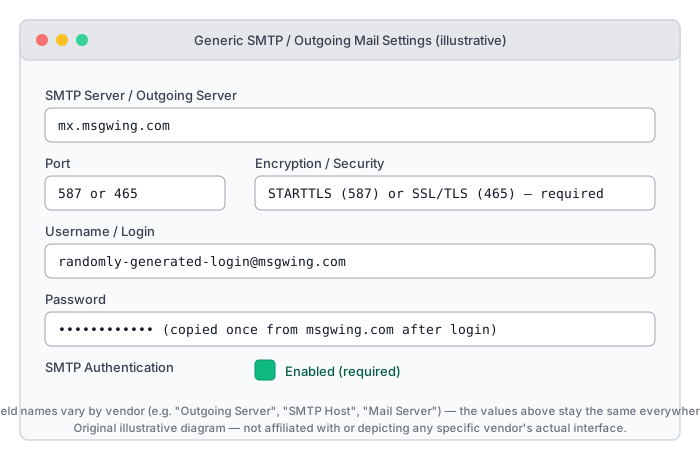
See README.md for how to obtain a login and password.
Self-hosted applications have their own pages. Immich, Vaultwarden, Gitea and Authelia each get the exact setting names, quoted from the vendor, plus the one limit most likely to catch you out there: Self-hosted applications and the Basic auth shutdown.
WordPress (contact forms, WooCommerce, password resets)
December 2026 changes this section. Username-and-password SMTP to Microsoft 365 stops working, and a WordPress site that cannot send looks exactly like one that can. WordPress email when Basic auth ends covers what breaks, which plugins have an OAuth route, and when a relay is the wrong answer.
Install a maintained SMTP plugin — e.g. WP Mail SMTP or Post SMTP — rather than relying on the default wp_mail()/PHP mail() transport, which most hosts throttle or block.
- Install and activate the plugin from the WordPress plugin directory.
- In the plugin’s Mailer settings choose Other SMTP.
- Fill in the values from the table above (SMTP Host, Port, Encryption, Authentication, Username, Password).
- Send the plugin’s built-in test email to confirm delivery.
Home Assistant (notify / smtp integration)
notify:
  - name: zerosmtp
    platform: smtp
    server: mx.msgwing.com
    port: 587
    timeout: 15
    sender: your-login@msgwing.com
    encryption: starttls
    username: your-login@msgwing.com
    password: !secret zerosmtp_password
    recipient:
      - you@example.com
Store the password in secrets.yaml, never directly in configuration.yaml. For implicit TLS use port: 465 and encryption: tls instead.
Grafana (alerting notifications)
In grafana.ini (or the equivalent environment variables):
[smtp]
enabled = true
host = mx.msgwing.com:587
user = your-login@msgwing.com
password = your-password
skip_verify = false
from_address = your-login@msgwing.com
starttls_policy = MandatoryStartTLS
Never set skip_verify = true — that disables certificate validation.
Zabbix (media type: Email)
Administration → Media types → Email → set:
- SMTP server:
mx.msgwing.com - SMTP server port:
587 - Connection security:
STARTTLS - SMTP authentication: enabled, with your
@msgwing.comusername/password - Email sending:
your-login@msgwing.com
Any other application / script
If an application only exposes generic “SMTP” fields (most CMSs, monitoring tools, and backup software do), use the values from the table above. If the application asks for a library or protocol name, any of the language examples in the repository root (e.g. python-zerosmtp.py, node-zerosmtp.mjs, php-zerosmtp.php) show the equivalent raw configuration for that ecosystem.
Limitations
- Outgoing mail only — do not configure any “incoming”/IMAP/POP3 field.
- Set the From address to your
@msgwing.comlogin. Whether the relay accepts a different From address is a policy decision of the msgwing.com service, not of this project — check the current terms on msgwing.com before relying on that, and do not use a From address you do not control.
Updated 27 Aug 2026